 Mancarta
Other trackers say what you own.Mancarta says where it is.
A catalogue of your Magic: The Gathering collection that remembers which box every copy is physically in. Hold a card up to the camera and it knows what it is — on the phone, with no server and no sign-up.
Free to use. One optional payment removes the limits — there is no subscription.
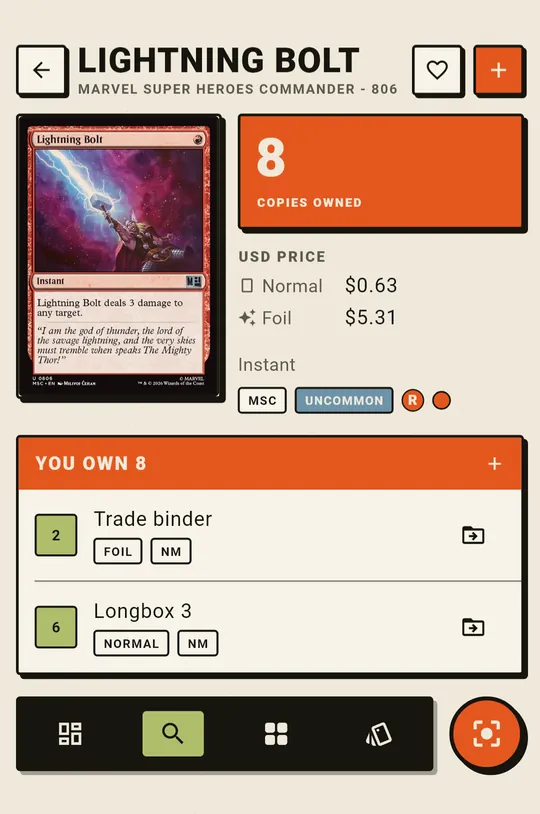
Not “you own four Lightning Bolts.” Two in the trade binder, one in Longbox 3, one already pulled for a deck.
Storage is a tree you describe the way your shelves really are — rooms, boxes inside boxes, binders, a page, a deckbox. Every card lives in exactly one of them, and the quantity is kept per container, so the answer to “where is it” is an address rather than a number.
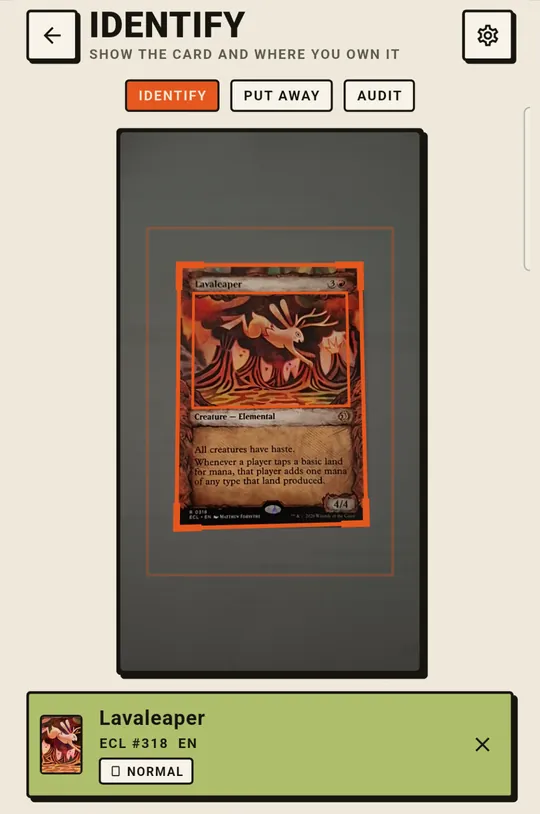
Hold a card up. It knows what it is.
Mancarta recognises a card from its artwork, on the device. No frame is ever uploaded and no server is involved — the whole card database is already on the phone.
- Keep scanning: cards land in whichever container you are filing into, one after another.
- When a card has been printed more than once, it reads the collector line to tell the printings apart — and asks you rather than guessing.
- A tap you can feel and a sound you can hear, so you can watch the cards instead of the screen.
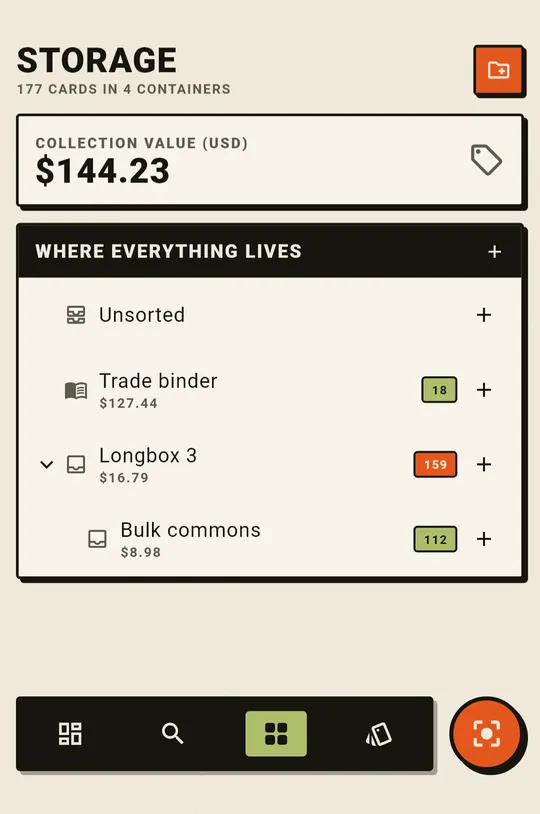
Describe your storage the way it really is
Boxes inside boxes, binders, deckboxes, a drawer per colour. Nest it as deep as you like; a count on every row tells you what is in that container and what is in the ones underneath it.
- Print QR labels and stick one on each box. Show a label to the camera and that box becomes where the next scans are filed.
- Move a card, or fifty, from one container to another — and a move is one indivisible step, so nothing can be lost halfway.
- Tags are the opposite of a place: a card can carry as many as you like, and a tag is never a folder.
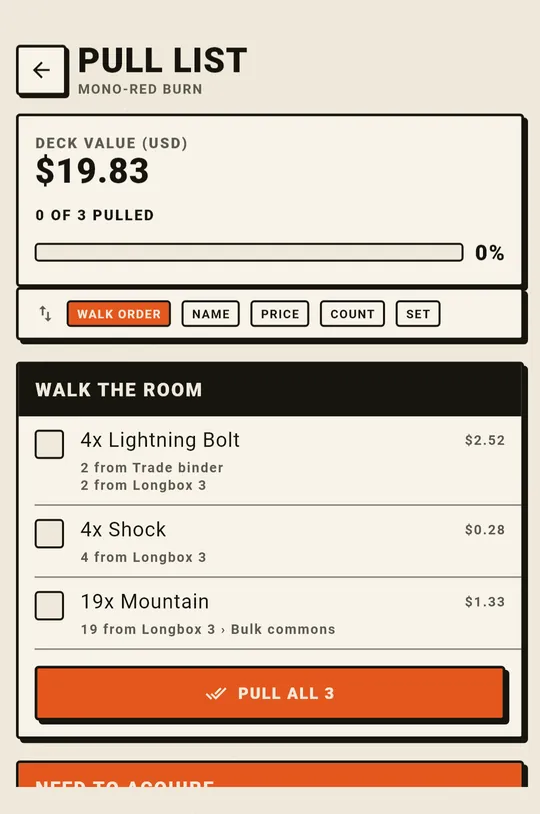
Fetch a whole deck in a single walk
Build a deck card by card, or paste an Arena list and Mancarta resolves it against what you actually own. Then it gives you a pull list ordered as a walk through your storage — box by box, so you fetch a deck in one pass instead of opening the same box six times.
- Each pulled card records the container it left, so putting the deck away afterwards is one tap.
- Export back to Arena, and see what a deck would cost to buy at normal prices.
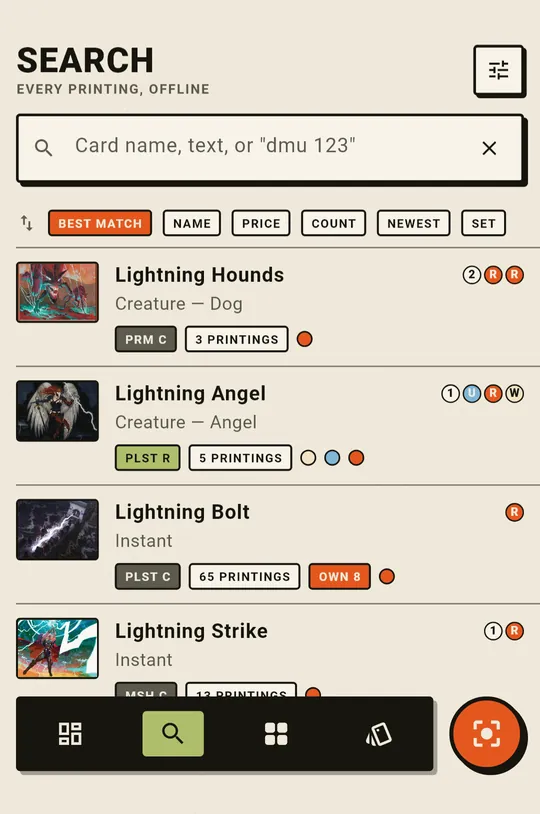
All 106,029 printings, already on the phone
Every English printing — every set, indexed for search and hashed for the scanner — ships inside the app. There is no download on first run and no account, and search works with the network off.
- Search by name, by rules text, or by set and collector number: dmu 123 finds exactly one card.
- One row per card rather than per printing, with a badge for how many printings exist and how many you own.
- Card pictures load from Scryfall as you browse. Everything else works on a plane.
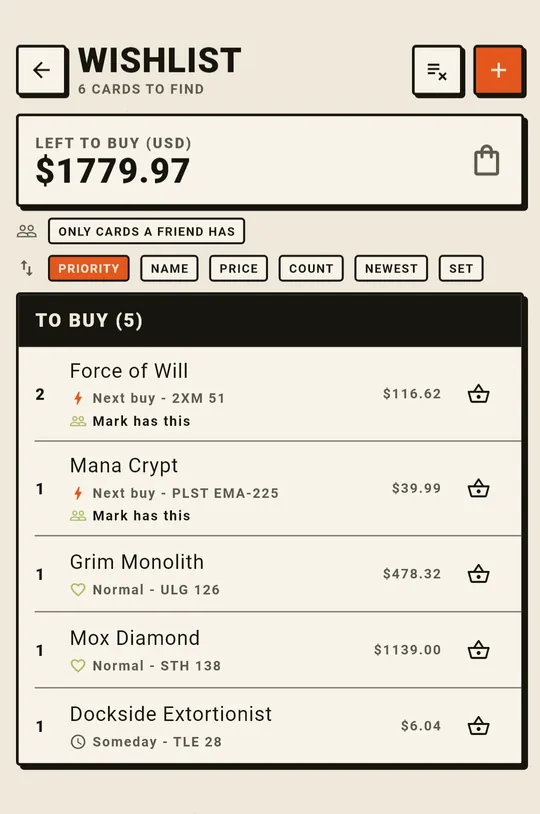
A shopping list that ticks itself off
Keep the cards you are hunting for in one place, with a priority and a price, and Mancarta marks one found the moment it turns up in your collection.
- Wanting a card never touches your totals: a wish adds nothing to what you own and nothing to what it is worth.
- Each line says whether one of your friends is holding a copy.
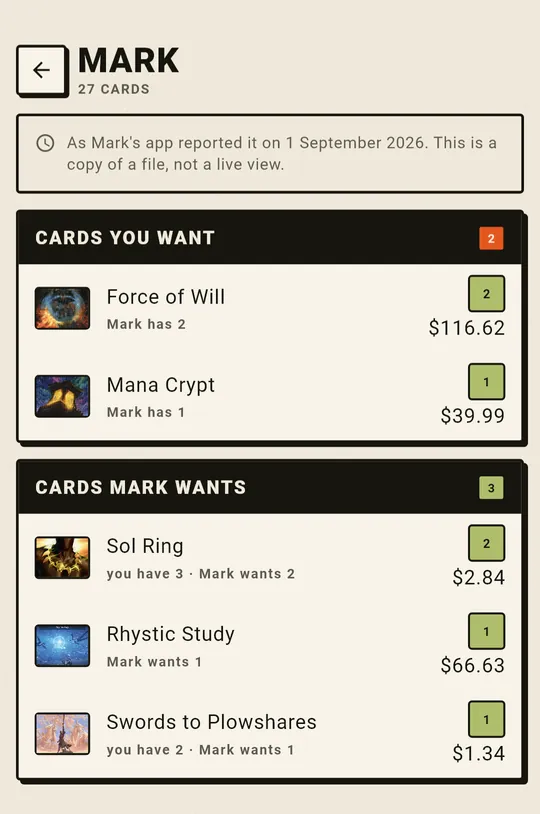
See what a friend has that you are hunting
Send someone your collection as a file — chat, mail, Drive, however you already send things. Open theirs and Mancarta answers both questions at once: which cards on your wishlist they are holding, and which of theirs you have.
- Worked out on your own device. No account, no server, and nobody waiting on a reply.
- The file carries cards and quantities and nothing about where you keep them.
- Send an updated one later and Mancarta shows what changed since last time.
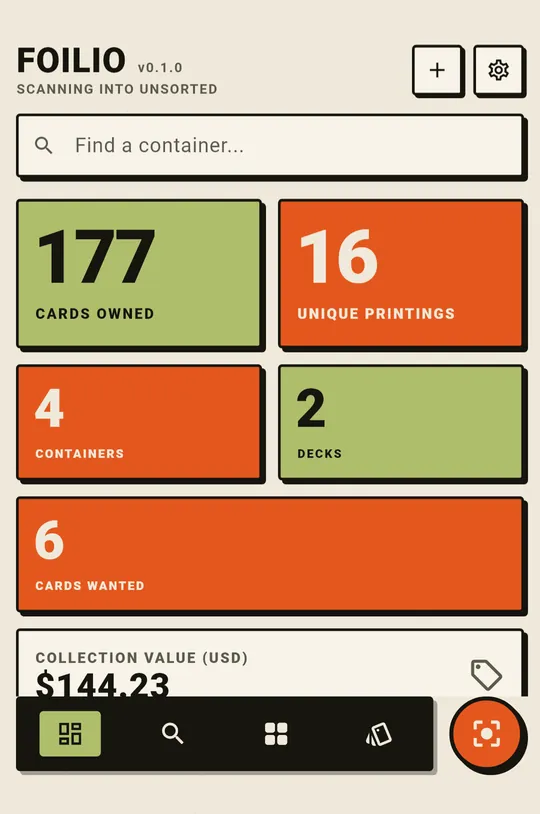
What you have, and what it is worth
Prices from a dated Scryfall bulk dump, in dollars or euros — per card, per box and for the whole collection, with a count of the cards nobody has a price for.
- Plainly labelled as an estimate rather than a valuation, and dated so you know how old it is.
- An unpriced shelf shows a dash rather than a zero. It is not a worthless one.
A label on the box, and both hands free
Print a sheet of QR labels — 30 to a US sheet, 21 to an A4 one, or a single big one to a page — and stick one on each box. Then, with the Scan tab open, hold a label up to the camera and that box becomes where everything you scan next is filed. A tap you can feel and the box's name on screen confirm the switch.
- Meant for a shelf and both hands full of cards: you change box without putting the cards down or touching the phone.
- The codes mean nothing outside Mancarta. They are mancarta:// rather than a link, so an ordinary camera app does nothing at all with one — a shelf of them gives nothing away, and a stray code on a card box cannot hijack a scan.
- A label is minted only when you print one, so most containers never have one.
Also in the box
The rest of it
Audit a box
Scan a whole container and get three lists — missing, unexpected, matching — then reconcile the lot in one action.
Arena import and export
Paste a deck list and Mancarta resolves it against what you own; export any deck back out in the same format.
Bring a collection with you
Import a CSV from ManaBox, Moxfield or a spreadsheet. Mancarta matches it against every printing, shows you what it found, and files the lot into one container — so you are not scanning eight thousand cards you have already catalogued once.
Backup as one file
Export the whole collection whenever you like and put it where you like. Import it back on a new phone. No account means nothing to lose access to.
Finish, condition and position
Foil, etched or normal; a condition per copy; and, if you want it, where in the box a card sits.
Coming soon on Windows
The same app, minus the camera, for cataloguing at a desk. It is built and runs today — it is simply not released yet.
Free & Pro
The free plan is the whole app, not a demo of it
Every feature is in it. The limits are quantities, and they only ever stop something new — nothing already saved is hidden, deleted or affected.
Free
£0 · with ads- 5 containers and 5 decks, 200 cards in each
- 100 cards scanned a day — a short advert adds ten more, as often as you like
- A 50-card wishlist
- Two friends' collections kept at a time
- Everything else in full: search, storage, pull lists, audits, QR labels, Arena import and export, prices, backup — and the entire card database
Mancarta Pro
One payment- Every limit above, gone. As many containers, decks, cards, scans and wishes as you like
- No advertising anywhere. The band is removed rather than left blank, and no advert is requested again
- Not a subscription. One payment through Google Play, in your own currency, and it stays bought
- Reinstalling or changing phone restores it — Play remembers the purchase, so there is still no account
Mancarta warns before a wall: a thin band appears on the last fifth of any limit, telling you the count and how much is left. Only when there really is no room does anything get refused, and then it is explained rather than silently ignored.
What it will not do
Three promises
Cards are never lost
Moving a card is one indivisible step. There is no moment when a copy has left one box and not yet reached the other, so a crash or a flat battery cannot make one disappear.
Nothing is uploaded
Your collection is a file on your device. Mancarta never signs in to anything, and no server holds your cards. Recognition happens on the phone.
Your data is yours
Export everything as one file, whenever you like, and put it where you like. There is no account to be locked out of and nothing to cancel.
Questions
Before you install it
Does it really work with no internet?
Yes, apart from two things. Card pictures are loaded from Scryfall while you browse and are never stored in the app, and Mancarta checks whether a newer card database has been published. Everything else — search, the scanner, storage, decks, prices, audits, backup — runs from the database inside the app.
Is there an iPhone version?
No, and there is none planned. Mancarta is an Android app. A Windows version is coming — the same app minus the camera, for cataloguing at a desk — but it is not released yet. The two will not share a collection; a backup file is how you would move one to the other.
Do I have to organise anything first?
No. A container called Unsorted always exists, so you can scan your first card before you have decided what a shelf is called, and move it later.
Where do the prices come from?
From a dated Scryfall bulk dump that ships with the card database, in US dollars or euros. They are shown as an estimate rather than a valuation, and the date they were taken is in Settings beside the currency.
What does the app collect about me?
Mancarta itself collects nothing — there is no account and no user identifier. The adverts on the free plan come from Google AdMob, which sees an advertising ID, the device model, an approximate region and which adverts were shown. Your collection is never part of that, and buying Pro stops all of it.
Which cards does it know?
Every English printing in Scryfall's catalogue at the time the database was built — 106,029 of them, across 714 sets. New sets arrive as a card-database update you tap to download.
Suggestion box
Goes straight to the person who wrote itMancarta is one person's app, and most of what is in it came from somebody saying “it should do this”. If something is missing, awkward, or a card would not scan, this is the place.
What you type is sent as an email and is not stored anywhere else — no database, no list, no analytics. Leaving the email box empty makes it anonymous, and there is then no way to reply. The privacy policy says exactly what happens to it.
Find out where that fourth Bolt went
Free, offline, and no account to make. Read the handbook first if you would rather see every screen before installing anything.